Pixelorama v1.2, new possibilities for pixel art


Artwork by Kellay, one of the artists for v1.2's splash screen artworks.
We are happy to announce that the newest version of Pixelorama, 1.2, is finally here! This is another major update, with a lot of new features that can completely change your workflow and haven't been seen in traditional pixel art editing before. It is genuinely exciting to bring something new to the pixel art world, and we hope the community loves these features as much as we do!
If you wish to support us, you can become a Patron and receive exclusive awards, or buy Pixelorama on Steam, or from itch.io!

IMPORTANT: Compatibility breaking changes
Unfortunately, every now and then, if we want to move forward and improve, some things have to be remade, leading in compatibility breaking changes.
Breaking change #1:
Due to the 3D layer remake mentioned below, the 3D layer data of pxo files is NO LONGER COMPATIBLE between v1.2 and older versions. The pxo files themselves should load just fine, but the 3D layers will be EMPTY. If you have existing projects that use 3D layers, make sure to finish them in v1.1.x and do not import them in v1.2. Or if you do, make sure to keep backups.
Breaking change #2:
In version 1.2, in an effort of making pxo files more portable, reference images are now stored inside them, instead of just having their file path stored and Pixelorama loading them in runtime. Now, you can rest assured that reference images will stay in your project even if you move the reference images around in your computer, or if you share your project with other devices. However, reference images from pxo files saved in v1.1.10 or older will fail to load in v1.2. The rest of the project will load fine, but not the reference images.
Breaking change #3:
This is a very minor change, but we should mention it nonetheless. You may notice that when you first open Pixelorama v1.2, you will see the dark theme, and not the theme you have previously chosen, if you had chosen any. This is because we re-made the theming system to allow you to easily make your own color combinations, without having to make entire extensions just to add a new theme. Of course, if you want to make your own theme from scratch, extensions are still an option, but if you only want to change the base colors, you can easily do it from the Preferences.
And that should be all of the breaking changes. Let's move to the exciting bits now, the new features!
A brand new keyframe-based timeline with support for non-destructive animated layer effects
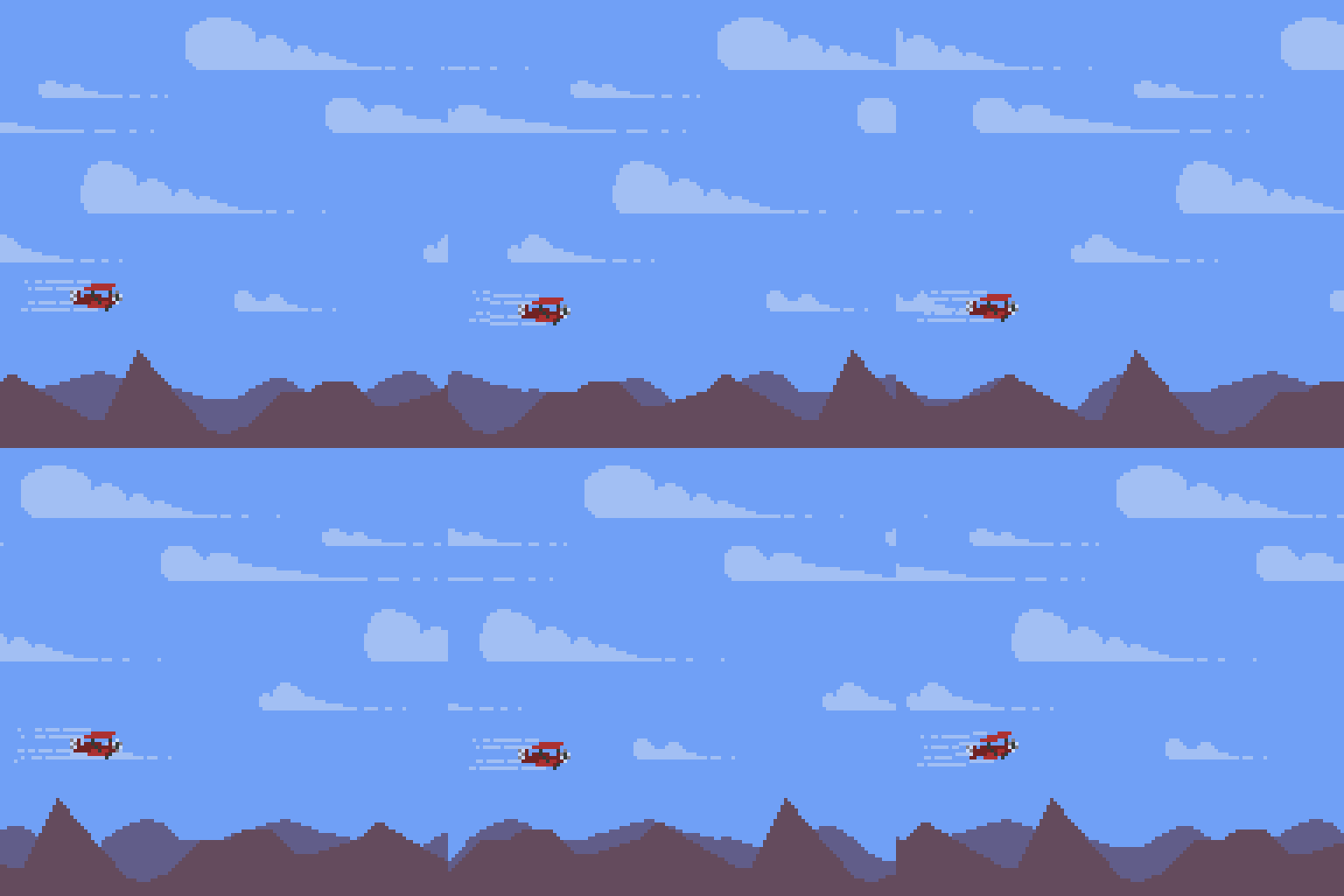
Pixelorama has had non-destructive layer effects for a while now, allowing you to easily make changes without worrying that they are permanently applied, unless you want them to be. Unfortunately, they could not be animated. Until today, that is! Version 1.2 brings you a brand new keyframe-based mode for the timeline, which lets you animate every property of layer effects across frames, with support for non-linear interpolation!
Are you making an animation that has a moving parallax background and you are manually offsetting it frame by frame? That's so yesterday! You can easily do it with the Offset & Scale layer effect by animating the position in the timeline. Just by adding a keyframe on the first frame and one on the last frame, all the in-between frames will manually be interpolated, saving you all of this tedious manual labor. Similarly, you can do other cool things like that with the rest of the layer effects. You can even load your custom Godot shaders as layer effects! Animating the opacity of layers is also possible this way, if you want to blink things in or out of existence!
Autotiling support for tilemap layers
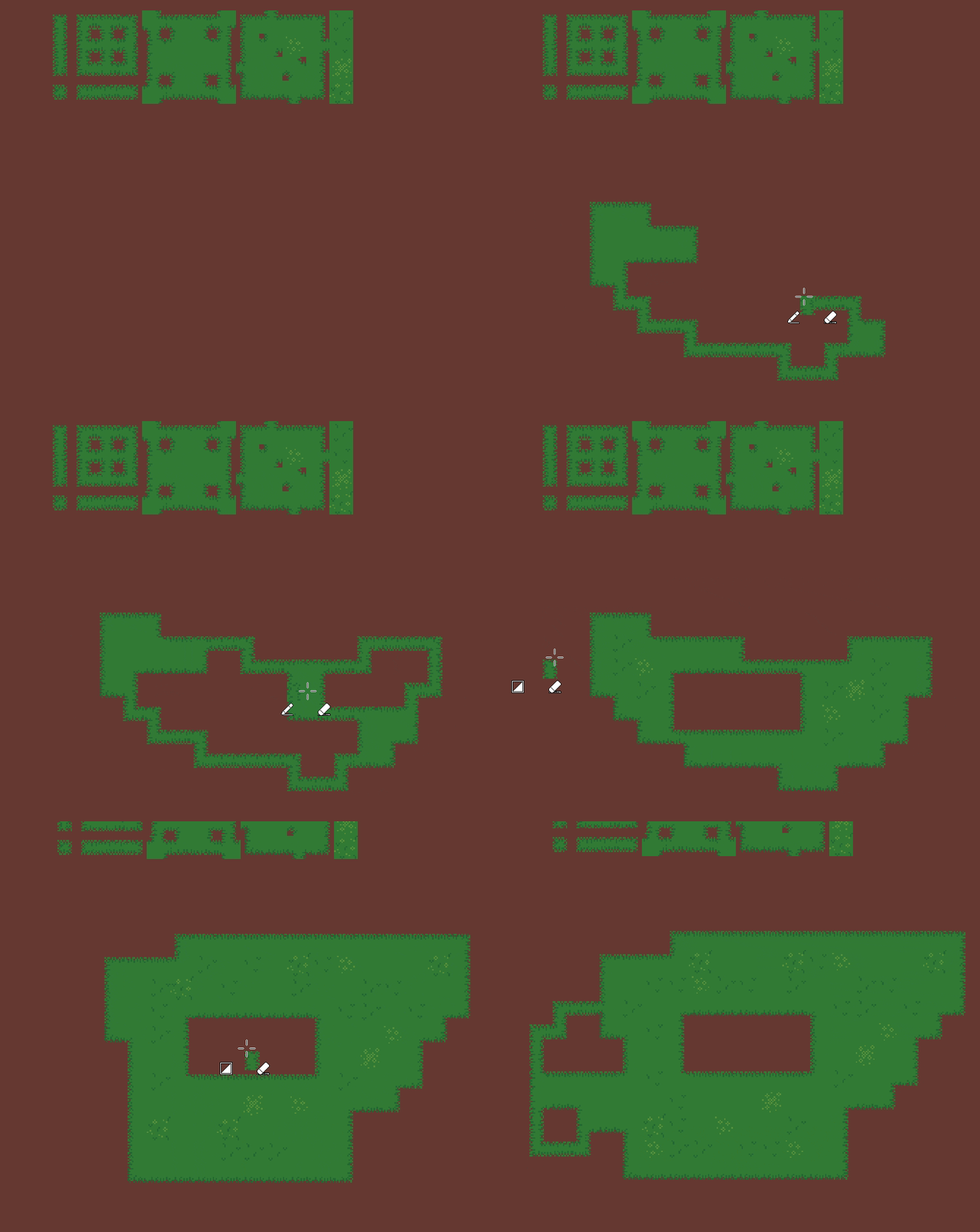
This is another new feature that completely changes the game for all of you fellow game developers out there. You can set up autotiling for tilemap layers within Pixelorama with the new Tiles Property Tool, and if you enable Autotiling (by clicking on the three vertical dots button on the Tiles panel), you will see it in action when you are placing tiles. Autotiling works with all drawing tools, allowing you to easily do level design tests with the tiles you are working on. And yes, if you export a tileset as a Godot TileSet resource, the autotiling terrain bits will be exported with it, saving you from having to do it twice!
In the future, we would love to add ways to automate the autotiling setup process, as well as exporting tilemaps as Godot TileMapLayer nodes. Also note that right now we're only support one terrain, but we are planning to allow for multiple terrains, for better integration with Godot.
Complete remake of the 3D layer system
3D layers, one of Pixelorama's unique features, are now a lot more powerful than they used to be. 3D objects are now being shared across the entire layer, instead of them being different for every cel. This makes them a lot easier to handle and animate... Speaking of which, you can now animate pretty much everything. The position, rotation and scale of the objects, their mesh data, their material data. And yes, you can finally edit the material properties of the 3D objects. You can even apply textures and edit them. The animations also interpolate the in-between frames, but as of right now they are not exposed to the keyframe timeline. We plan on working on that in the future, if there is desire for more work to be done in the 3D layers. It is now also possible to load entire scenes from .gltf files.
And, the cherry on top... You can now use the pencil tool to draw directly on top of 3D models!. Note that this feature is still experimental and may not always produce accurate results all of the time, but it is there if you want to give it a try! And you can even have different drawings on the same 3D object in different frames.
A couple of notes however. First, as we mentioned above, this breaks compatibility between v1.2 and older versions. 3D layers from older versions will not open in v1.2, and vice versa. Second, because all cels now share the same nodes, when making a change in one of the cels that affect the other cels (or when undoing something in a different cel that the one that is currently selected), you MUST select the other cels in order for the cel image to update, because the animation needs to play behind the scenes in order for Pixelorama to grab a screenshot of the cel's viewport at the appropriate time. Otherwise, when exporting, the frames will look wrong. So basically, make sure to play your animation first before exporting! At the moment, this is relevant only for animations with 3D layers.
A new "Flat to Isometric" effect
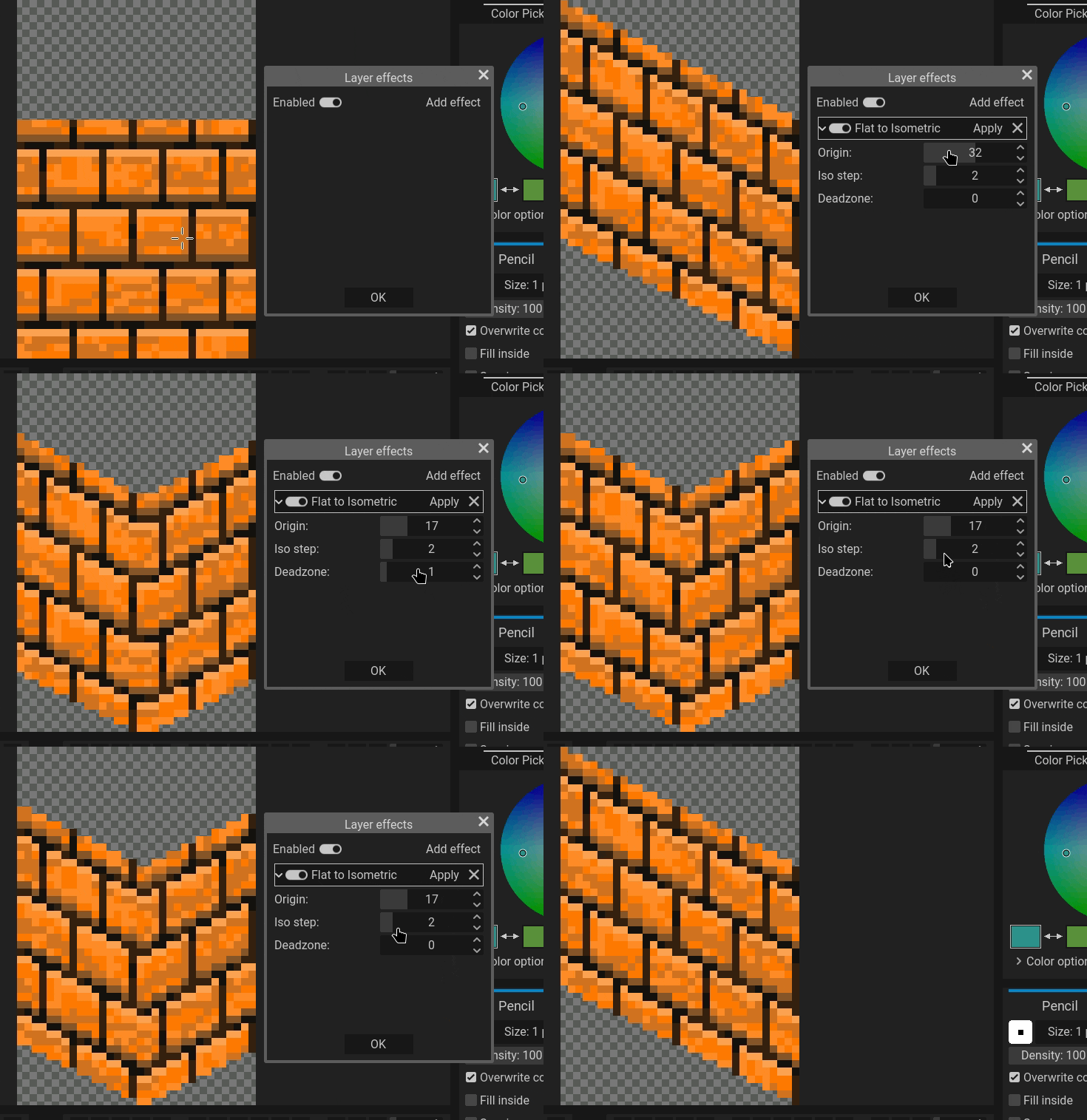
Back to more traditional pixel art now, we have added a new effect that can help you transform your flat sprites into isometric. The way it works is that it starts from an origin point, and goes left and right to move the pixels up, the amount of pixels is given by you but the step is usually 2px, thus creating a "staircase" of pixels. For simple objects and tiles this should be enough, but for more complicated items you will most likely need to do some cleaning on your own.
Steam Cloud support for your projects
As an extra gift for the wonderful people who have supported us by purchasing Pixelorama on Steam, we are giving you the ability to sync your Pixelorama projects across devices! You can save up to 500 projects (or 2GB total, whichever comes first). We'd also like to remind you that, while this is helpful, you should always make sure to backup your projects in more places and keep copies of them, in case something goes wrong!
To use Steam Cloud, you have to manually save your projects in Pictures/Pixelorama/SteamCloud/. The path is similar in all operating systems. Files saved anywhere else will not be synced, and only Pixelorama projects ending in the .pxo file extension will be synced. Also, if you have two or more instances of Pixelorama open in different devices and they both try to sync, it is possible you will run into sync errors, so please be mindful of that! Please also note that while we have done some limited testing, this is the first time we are enabling Steam Cloud for the public, so it is very possible something may not work properly at first. Please test it first and if something doesn't work, please report it to us so we can fix it!
Full changelog of version 1.2:
Added
- Added a keyframe-based view on the timeline, allowing users to animate layer opacity and layer effects with interpolation support. #1417
- Implemented autotiling support for tilemap layers, with a new tool for tilemap layers that allows users to set the autotiling bits on each tile. #1482
- The 3D layer system has been completely re-written! 3D objects are now shared across all cels of a layer, instead of each cel having its own objects, making it possible to animate an object's properties. This re-write also allows for some other new features, such as material property editing (and animating!), importing GLTF scenes, and even drawing directly on 3D objects using the pencil tool! IMPORTANT NOTE: Due to this, the 3D layer data of pxo files is NO LONGER COMPATIBLE between v1.2 and older versions. The pxo files themselves should load just fine, but the 3D layers will be EMPTY. #1429
- The shape tools now support drawing with brushes.
- Implement rounded rectangle drawing in the rectangle tool.
- Added a "Flat to Isometric" image & layer effect.
- Users can now change the colors of the UI by changing the theme's base color, accent color & contrast directly from the Preferences, making Pixelorama even more configurable & accessible, without having to rely on extensions. #1515
- Added two new themes:
Black (OLED)andSystem.Systemis a special theme that follows the Operating System's base & accent colors, and it even automatically updates if the OS' theme changes while Pixelorama is running! This should work for Windows, macOS and Android, while Linux only supports accent color at the moment. #1515 - Added quick tool activation shortcuts. When a quick tool shortcut is being held, that tool gets activated until the shortcut is released. By default, only the color picker tool has a shortcut, which ic set to Alt, but you can set shortcuts for every other tool in the Preferences.
- Added a new "Reselect" option in the Selection menu, which re-creates a previously cleared selection. By default, its shortcut is set to Control + Shift + D.
- Added new blend modes: Intersect and Match colors! #1474
- Added a hotkey to close the current project. Set to Control + W by default. #1548
- Added an option in the export dialog to repeat the animation as many times as you want. #1508
- Added a "crop to selection" mode in the advanced options of the export window. #1521
- Exporting tilesets is now also possible from the layer properties of a tilemap layer.
- Added a preview and a transpose option when exporting tilesets.
- New projects can now have the clipboard image (either app or system clipboard) as their content. Clipboard sizes have also been added in the Template list, if you just want to get the clipboard size but not the image itself.
- The paint select tool can now select entire grid cells. #1533
- A default license option for projects has been added in the preferences. #1526
- Exporting a tileset as a Godot TileSet resource now saves the probability of each tile.
- Importing Krita projects now also loads their layer opacity keyframe data, if they have any.
Changed
- Reference images are now stored inside pxo files. NOTE: This is a breaking change as reference images will fail to load from pxo files saved in v1.1.10 and older.
- Made layer hierarchy status more readable by adding lines to layer buttons in the timeline, for layers that belong to groups.
- Selection gizmos are now hidden and disabled when there is no active selection tool. Now, you no longer have to worry about accidentally transforming selections while drawing.
- The brush no longer gets resized with mouse movement when a tool is being used. This prevents issues where you could hold Control + Shift to draw lines at snapped angles, and the brush would resize at the same time.
- The Command key is now used for selecting timeline properties on macOS. #1544
- Adding a new layer while a collapsed group layer is selected now places it outside of that group.
- Made some UI elements, such as tool, cel, layer & frame buttons be focusable with the keyboard and activatable by pressing Space and/or Enter.
- The bezier points of the curve tool now lie at the center of the pixels instead of their corner. #1495
- The mad width of project tabs has been limited to 256 pixels, to prevent issues where, if the project name was too long, it would hide parts of the UI.
- [Android] Project's read and write permissions now persist after the app is closed.
Fixed
- Fixed resizing selection not being snapped to the pixel grid.
- Fixed crash when switching to a different project while a transformation is active on a tilemap layer.
- Fixed manual mode in tilemap layers not updating all cells when there is more than one tilemap layer sharing the same tileset.
- Tilemap layer bucket fill now works properly with random tiles.
- The bucket tool no longer affects locked & invisible layers.
- Fixed project tabs sometimes displaying the wrong project name. #1489
- If a layer is added in a collapsed group layer (such as when undoing a layer deletion) now expands that group.
- Various fixes and improvements in grid center snapping. #1533 & #1545
- Fixed the bucket tool not auto-converting global palettes to project palettes. #1538
- The keyboard no longer gets stuck on activating elements in the user interface after renaming a layer. #1524
- The Gaussian blur effect no longer generates darkened edges. #1523
- Exporting split layers now works properly with a selected amount of layers. #1532
- Fixed exported file name being set to "untitled" even if the project has a name.
- Fixed issue where when you batch exported and the "Create new folder for each frame tag" option is enabled, the export folder became the folder of the first "tag", instead of the folder where the .pxo file is located. #1540
- Fixed issue where the tags were not being visible if Pixelorama is opened with a file.
- Fixed a crash when loading a Krita project that had keyframes for stuff like opacity, but no image data for frames.
- Fixed selection marching ants outline not appearing when pasting.
- Cel button previews are now properly updated when creating new frames for a project that has a fill color.
- Fixed the unfocused border color of embedded windows in non-dark themes.
- Fixed hardware related issue where layer opacity & blend mode did not update in certain mobile GPUs. #1546
- Make UI elements in the audio layer properties stack properly.
- Fixed extension exporters not working. #1497
Removed
- Removed tool & background color options from the Preferences in favor of the new theming system. If there is enough demand for them, we could add them again. #1515
What's next?
As always, when releasing a major update, I like to share some ideas I have for the future.
- Keep developing the Android version. Make the UI more touch-friendly and support features such as cloud syncing and palm rejection. Eventually, release it on places such as F-Droid and Play Store.
- An effect graph which will let users create effects directly within Pixelorama itself.
- Vector layers, for non-destructive shape editing and text editing.
- Even more tools, such as a gradient tool and slices.
- Support for skeletal, bone-based 2D animation system.
- Make autotiling even more powerful by supporting multiple terrains and exporting tilemaps to Godot.
- More 3D layer improvements, such as making animating 3D objects work with the keyframe timeline, and exporting scenes as gltf files.
- A more powerful brush system, perhaps giving the ability for users to create their own code-based brushes instead of just images.
- Better compatibility with other software, such as exporting directly to Godot nodes and resources in the form on AnimationPlayer, AnimatedSprite, TileSet and TileMapLayer, etc.
- A rewrite of the canvas code that will allow editing either the same, or multiple projects at the same time, using multiple canvases.
- Performance improvements, especially for operations that affect a large number of pixels. Some of the algorithms we use may have to be re-written in C++.
- More extensions, such as one that allows multiple people to draw in real-time on the same project over the internet.
Happy painting, and keep pixelating your dreams! 🎨✨